 Green is good! You're done with this measure and you met the
recommended quality guidelines!
Green is good! You're done with this measure and you met the
recommended quality guidelines!"Go for
the green - it helps the team!"
 Yellow means you're not done yet! There are still unanswered
questions for this measure!
Yellow means you're not done yet! There are still unanswered
questions for this measure!"Don't
settle for yellow - ask the fellow!"
 Red
is bad! You're done with this measure, but you may want to go
back, address your treatment deficiencies if possible, then change your
answers to relect your improved performance!
Red
is bad! You're done with this measure, but you may want to go
back, address your treatment deficiencies if possible, then change your
answers to relect your improved performance!"Red is
bad - it makes patients sad!"
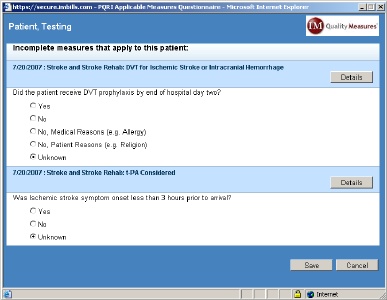 When a
bill is saved containing a CPT/ICD combination that requires
further documentation related to the performance of an active quality
measure, a measure pop-up window will appear to alert the user a
measure has been triggered. A short list of qualifying
questions
may need to be answered to determine whether or not the patient truly
qualifies for
the measure being tracked, but any qualifying questions for which data
already exist within the IM Practice Manager™ database will be answered
automatically. Based on the answers
provided in the qualifying question(s), the appropriate measure
questions
(if any) will then appear. A "Details" button will appear to
the
right of each measure title, which provides an in-depth description,
rationale, and the clinical recommendation statements for the measure.
When a
bill is saved containing a CPT/ICD combination that requires
further documentation related to the performance of an active quality
measure, a measure pop-up window will appear to alert the user a
measure has been triggered. A short list of qualifying
questions
may need to be answered to determine whether or not the patient truly
qualifies for
the measure being tracked, but any qualifying questions for which data
already exist within the IM Practice Manager™ database will be answered
automatically. Based on the answers
provided in the qualifying question(s), the appropriate measure
questions
(if any) will then appear. A "Details" button will appear to
the
right of each measure title, which provides an in-depth description,
rationale, and the clinical recommendation statements for the measure. 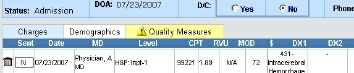 The Quality Measures tab is located just to the right of the "Charges"
and
"Demographics" sub-tabs on the main "BILLS" tab, and the color of the
Quality Measures tab will serve as an alert system, indicating the
status
of measures triggered for that patient. If there
have been
no measures triggered for the patient, the tab label will be grayed
out, and the tab background will have no color. If there is
only
one
measure for the patient, the tab coloration will simply match the
status coloration of that measure. If there are multiple
measures, however, the status tab coloration will reflect the status of
the measures according to a hierarchy of urgency. Incomplete
questionnaires (yellow) are considered the most urgent (since they are
potential positive results that will be reported as negatives if left
unanswered), so any combination of measure states that include at least
one incomplete measure will result in a yellow Quality Measures
tab.
Complete measure questionnaires reflecting unsatisfactory quality
performance (red) have the second highest priority (since they alert
physicians to the possibility of poor quality performance), so any
group of measures that have at least one red measure state and no
yellow measures will result in a red Quality Measures tab.
Therefore,
the Quality Measures tab will only be green when all
applicable measure questionnaires have been completed and they all
indicate satisfactory quality performance.
The Quality Measures tab is located just to the right of the "Charges"
and
"Demographics" sub-tabs on the main "BILLS" tab, and the color of the
Quality Measures tab will serve as an alert system, indicating the
status
of measures triggered for that patient. If there
have been
no measures triggered for the patient, the tab label will be grayed
out, and the tab background will have no color. If there is
only
one
measure for the patient, the tab coloration will simply match the
status coloration of that measure. If there are multiple
measures, however, the status tab coloration will reflect the status of
the measures according to a hierarchy of urgency. Incomplete
questionnaires (yellow) are considered the most urgent (since they are
potential positive results that will be reported as negatives if left
unanswered), so any combination of measure states that include at least
one incomplete measure will result in a yellow Quality Measures
tab.
Complete measure questionnaires reflecting unsatisfactory quality
performance (red) have the second highest priority (since they alert
physicians to the possibility of poor quality performance), so any
group of measures that have at least one red measure state and no
yellow measures will result in a red Quality Measures tab.
Therefore,
the Quality Measures tab will only be green when all
applicable measure questionnaires have been completed and they all
indicate satisfactory quality performance.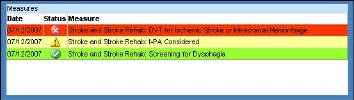 Mousing over the Quality Measures tab will open a status overview
pop-up
window, showing the date, status, and description of each measure
triggered for that
patient. The status overview pop-up window allows users to
quickly review the status of each measure triggered for the patient,
which will clarify how the status/coloration of individual measures
relate to the current coloration of the Quality Measures tab.
A yellow
entry with a measure description of "Age Unknown" will appear when a
qualifying question related to patient age was left unanswered (so the
system has not yet been able to evaluate measure
applicability).
Moving the mouse from the Quality Measures tab will close the status
overview pop-up window.
Mousing over the Quality Measures tab will open a status overview
pop-up
window, showing the date, status, and description of each measure
triggered for that
patient. The status overview pop-up window allows users to
quickly review the status of each measure triggered for the patient,
which will clarify how the status/coloration of individual measures
relate to the current coloration of the Quality Measures tab.
A yellow
entry with a measure description of "Age Unknown" will appear when a
qualifying question related to patient age was left unanswered (so the
system has not yet been able to evaluate measure
applicability).
Moving the mouse from the Quality Measures tab will close the status
overview pop-up window.